A wireless webcam is a camera that sends video to a computer, phone or cloud service over Wi-Fi or Bluetooth instead of a USB cable. It suits people who want to place a camera away from their desk, monitor a room, or stream from angles a wired cam cannot reach. The trade-off is that you depend on battery or outlet power and on the quality of your wireless signal. You might also like Mirrorless vs DSLR.
This guide explains how wireless webcams work, which features actually matter, where they make sense, and what to check before you buy one.
How a Wireless Webcam Works
Every webcam has the same core parts: a lens, an image sensor, a processor that compresses the video, and a way to send that video somewhere. A wired webcam pushes the stream down a USB cable. A wireless webcam encodes the video and transmits it over a radio link instead.
There are three common setups:
- Wi-Fi to the cloud or an app: The camera joins your home or office network and streams to a companion app or cloud service. This is how most home monitoring cameras work.
- Wi-Fi direct to a computer: Some cameras appear on your PC as a network camera or through a driver, so you can use them in Zoom, Teams or OBS.
- Bluetooth or a proprietary dongle: A small receiver plugs into your computer and pairs with the camera. This keeps setup simple but limits range.
Because the video is compressed before it leaves the camera, image quality depends on both the sensor and the available bandwidth. A strong Wi-Fi signal gives you smoother, sharper video; a weak one causes stutter, lag or dropped frames. If your connection is unreliable, the router and broadband plan matter as much as the camera itself — our guide to home broadband options covers what to look for in a connection.
Wireless vs Wired Webcams at a Glance
| Factor | Wireless webcam | Wired (USB) webcam |
|---|---|---|
| Placement | Anywhere within signal range | Limited by cable length |
| Video latency | Slightly higher; depends on network | Very low and consistent |
| Power | Battery, outlet or USB power adapter | Powered through the USB cable |
| Setup | App pairing and network setup | Usually plug-and-play |
| Best for | Monitoring, flexible streaming angles, multi-room use | Daily video calls at a desk |
| Main risk | Signal drops and security of the network | Cable clutter, fixed position |
In short, if your camera will sit on top of a monitor all day, a wired model is usually simpler and more reliable. If you need to move it, mount it somewhere awkward, or watch a space while you are away, a wireless webcam earns its place.
Key Features to Look For
Resolution and Frame Rate
Most current models record at 1080p (Full HD), and premium cameras offer 2K or 4K. For video calls, 1080p at 30 frames per second is plenty, because most meeting platforms compress video anyway. For streaming or recording footage you will review later, higher resolution and 60 fps make a visible difference, but only if your upload bandwidth can keep up.
Connectivity and Range
Check whether the camera supports 2.4 GHz Wi-Fi, 5 GHz, or both. 2.4 GHz travels further through walls but is more crowded; 5 GHz is faster but has shorter range. Indoor range is commonly quoted at around 100 to 300 feet in open space, but walls, floors, microwaves and other wireless devices can cut that significantly. Test the spot where you plan to mount the camera before you commit to it.
Power Source
Wireless cameras are either battery powered, plug-in, or both. Battery models are easy to place but need recharging, and they often reduce recording or wake the camera only on motion to save power. Plug-in models can stream continuously. Some outdoor models support small solar panels to top up the battery.
Built-in Microphone and Speaker
A built-in microphone makes a webcam useful for calls without a separate headset. Two-way audio (microphone plus speaker) matters more for monitoring cameras, where you might want to talk to a pet, a delivery driver or a child in another room.
Pan, Tilt and Zoom (PTZ)
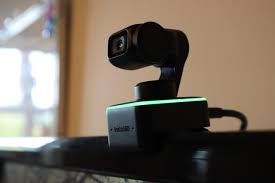
PTZ cameras let you rotate and zoom remotely. This lets one camera cover a whole room instead of a fixed slice of it. Note that many budget models use digital zoom, which crops the image and loses detail, rather than optical zoom.
Motion Detection and Night Vision
For security use, motion alerts and infrared night vision are the features that matter most. Look for adjustable sensitivity and activity zones so a passing car or a ceiling fan does not trigger constant notifications.
Storage Options
Footage can be saved locally on a microSD card, on a network storage device, or in the cloud. Local storage avoids monthly fees; cloud storage keeps footage safe if the camera itself is stolen. Many brands lock features such as long video history or smart alerts behind a subscription, so check the ongoing cost before buying.
Where Wireless Webcams Make Sense
Home Monitoring
This is the most common use: keeping an eye on a front room, a nursery, pets, or an entrance. Real-time alerts and remote viewing from your phone are the main draw. Place cameras to cover entry points rather than every corner, and avoid pointing them at a neighbor’s property.
Small Business Surveillance
Shops, small offices and stockrooms use wireless cameras because they avoid running cables through walls or ceilings. They are quick to add, and you can scale from one camera to several without new wiring. For a busy site with many cameras, though, a wired PoE (Power over Ethernet) system is often more reliable.
Video Calls and Remote Work
A wireless webcam can be useful when you present from a whiteboard, demonstrate a physical product, or want a second angle in a meeting. For a standard daily call at your desk, a wired webcam is usually the steadier choice because it has lower latency.
Streaming and Content Creation
Creators use wireless cameras to capture overhead shots, a second angle on a desk or kitchen counter, or a wide room view without long cable runs. Using a phone as a wireless webcam through apps or built-in operating system features is a popular low-cost option here.
Online Classes and Telehealth
Teachers can position a wireless camera to show a demonstration or a document, and patients can use one during remote consultations when a fixed laptop camera is awkward. In both cases, a stable connection matters more than a high resolution.
How to Choose the Right Wireless Webcam
Work through this checklist before you buy:
- Define the main job. Video calls, security, or streaming each favor different features.
- Test your Wi-Fi at the mounting spot. Run a speed test from your phone where the camera will sit. If it is weak, plan for a mesh node or extender.
- Confirm platform support. For calls, make sure the camera works with your operating system and meeting apps. For monitoring, check the app on both iOS and Android.
- Compare total cost. Add any subscription for cloud recording or smart alerts to the purchase price.
- Check power needs. Decide whether battery convenience or continuous recording matters more.
- Review security features. Look for encrypted streams, two-factor authentication on the account, and regular firmware updates.
- Check smart home compatibility. If you use a voice assistant or hub, confirm the camera integrates with it.
Setting Up a Wireless Webcam Step by Step
- Charge the camera fully or connect it to power.
- Install the manufacturer’s app or driver and create an account with a strong, unique password.
- Put the camera in pairing mode and connect it to your Wi-Fi network (many models only support 2.4 GHz during setup).
- Update the firmware before anything else.
- Turn on two-factor authentication for the account.
- Mount the camera, check the live view, then adjust motion zones and alert sensitivity.
- For video calls, select the camera as the video source in your meeting or streaming software and run a test call.
Common Mistakes to Avoid
- Mounting before testing the signal: A camera that drops offline at night is worse than no camera.
- Leaving default passwords and old firmware: This is the most common reason home cameras get compromised.
- Ignoring the subscription: A cheap camera can become expensive if key features require a monthly plan.
- Pointing cameras at windows: Infrared night vision reflects off glass and washes out the image.
- Overlooking privacy: Turn off indoor cameras or use a privacy shutter when you are home, and follow local rules on recording audio.
Where Wireless Webcams Are Heading
Several trends are shaping the next generation of wireless cameras. On-device AI is improving person, package and pet detection, which reduces false alerts and keeps more processing off the cloud. Newer Wi-Fi standards bring better performance on crowded networks. Smart home standards such as Matter are expanding device compatibility across ecosystems, and battery life and solar charging continue to improve, making cameras easier to place outdoors.
For more practical tech explainers, browse our Technology section, and if you run a small business, our piece on top digital marketing strategies is worth a look.
Bottom Line on Wireless Webcams
A wireless webcam is the right choice when placement flexibility or remote monitoring matters more than the lowest possible latency. Pick a model based on its main job, test your Wi-Fi where it will sit, budget for any subscription, and lock down the account with a strong password and two-factor authentication. Do that, and a wireless camera will be a reliable tool rather than a source of dropped streams and false alerts.
FAQs
What is the range of a wireless webcam?
Range depends on the camera and your network. Indoors, 100 to 300 feet in open space is a common figure, but walls, floors and interference from other devices can cut it sharply. Test the signal at the exact mounting spot before installing.
Do wireless webcams need an internet connection?
An internet connection is needed for remote viewing, phone alerts and cloud storage. Some cameras can record to a microSD card or stream on a local network without internet access, but you lose remote features.
Can wireless webcams record video?
Yes. Most wireless webcams record either to a local memory card, to network storage, or to a cloud service. Cloud recording often requires a paid plan, so check this before you buy.
Is a wireless webcam good for Zoom and Teams calls?
It can be, as long as the camera is supported by your computer and meeting app. For everyday desk calls, a wired USB webcam is usually more stable because it has lower latency and never depends on Wi-Fi quality.
What does PTZ mean on a wireless webcam?
PTZ stands for pan, tilt and zoom. A PTZ camera can be rotated and zoomed remotely from an app, so one camera can cover a wider area. Many affordable models use digital zoom, which reduces image detail.
Are wireless webcams secure?
They can be secure if you use a strong unique password, enable two-factor authentication, keep the firmware updated and choose a brand that encrypts its video streams. Cameras left on default settings are the most vulnerable.