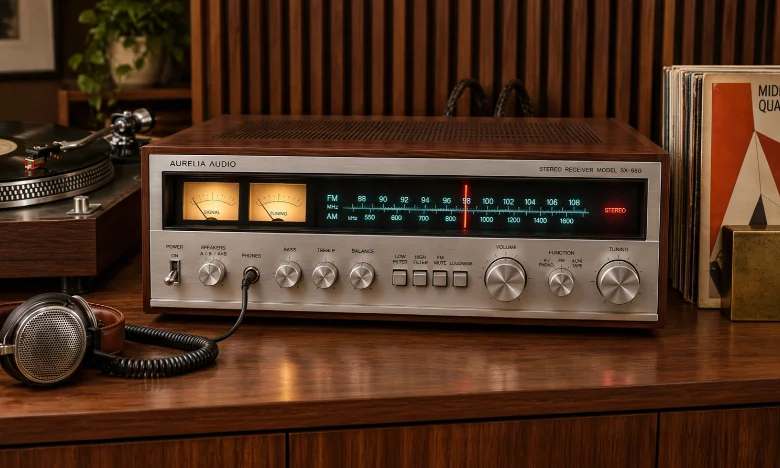
A stereo receiver combines amplification, source control, and radio reception in one component. Modern models can also add Bluetooth, Wi-Fi, streaming services, phono inputs, and television connections. The right choice depends more on your speakers and sources than on the largest wattage number.
Direct answer: Choose a two-channel receiver by matching its power and impedance support to your speakers first. Then check the inputs your sources need, including phono, optical, HDMI, Bluetooth, or Wi-Fi. Consider subwoofer support and future expansion before paying extra for features you may never use.
| Buying Factor | What to Look For | Why It Matters |
|---|---|---|
| Channels | Two powered channels | Designed for left and right speakers |
| Power | Appropriate output for your speakers and room | Helps provide clean listening levels |
| Speaker impedance | Compatibility with your speaker rating | Supports safe, reliable operation |
| Phono input | Built-in MM phono stage if needed | Lets many turntables connect directly |
| Digital inputs | Optical or coaxial | Useful for TVs, streamers, and CD players |
| HDMI | ARC or eARC on selected models | Simplifies TV audio and volume control |
| Wireless | Bluetooth, Wi-Fi, AirPlay, or streaming | Adds convenient music playback |
| Subwoofer output | One or more outputs | Makes adding deeper bass easier |
| Speaker A/B | Optional second speaker pair | Useful for another room or listening area |
Key Takeaways
- A two-channel receiver is designed mainly for music rather than surround sound.
- Speaker compatibility matters more than chasing the biggest advertised wattage.
- A phono input is useful if your turntable lacks its own phono preamp.
- HDMI is worth considering when your television is a major audio source.
- Wi-Fi generally offers more streaming flexibility than Bluetooth alone.
- Extra features only add value when they fit your actual listening habits.
What Is a Stereo Receiver?

A Stereo Receiver combines several traditional audio components inside one chassis. It normally includes a preamplifier, power amplifier, input switching, and a radio tuner. That combination makes it a practical center for a simple home music system.
Traditional models focused on analog sources and AM or FM radio. Current designs can include digital inputs, network playback, USB, Bluetooth, and app-based streaming. Some models even add HDMI for easier television integration.
This design differs from buying separate preamplifiers, amplifiers, and tuners. Separates can provide greater upgrade flexibility, but they also require more space and connections. A receiver keeps the system simpler while still supporting several music sources.
Stereo Receiver vs. AV Receiver vs. Integrated Amplifier
These products may look similar, but they serve different purposes. Choosing the wrong type can leave you paying for unused features. It can also limit your system when your listening priorities change.
| Component | Main Purpose | Typical Channels | Radio Tuner | Video Support |
|---|---|---|---|---|
| Two-channel receiver | Music and simple TV audio | 2 | Usually yes | Sometimes |
| AV receiver | Movies, gaming, surround sound | 5 or more | Often | Yes |
| Integrated amplifier | Dedicated two-channel music | 2 | Usually no | Varies |
An AV receiver makes more sense when you want surround speakers or Dolby Atmos. It handles multichannel decoding and usually provides several HDMI inputs. Those capabilities add complexity that a music-only system may not need.
An integrated amplifier is closer to a two-channel receiver. Both combine a preamplifier and power amplifier in one enclosure. The traditional difference is that the receiver also includes a broadcast tuner.
How Much Power Do You Need?
Wattage is one of the most misunderstood specifications in home audio. A larger number does not automatically produce better sound. Speaker sensitivity, listening distance, room size, and impedance all affect real-world volume.
Many home systems do not require huge continuous power output. Efficient bookshelf speakers can reach satisfying levels with modest amplification. Larger rooms and less efficient speakers can benefit from greater power reserves.
Power specifications also need context before you compare models. Manufacturers may measure output at different impedances, frequencies, distortion levels, or channel loads. Compare ratings measured under similar conditions whenever possible.
For example, Sony lists its STR-DH190 at 100 watts per channel under specified test conditions. Yamaha rates the R-N600A at 80 watts per channel into eight ohms across a wider frequency range. Those figures should not be compared without considering the different measurement conditions.
Match the Receiver to Your Speakers
Start by checking the impedance rating printed on your speakers or listed by their manufacturer. Then confirm that the amplifier supports that load. This basic check matters more than many convenience features.
Speaker sensitivity also helps explain how much output you may need. A more sensitive speaker produces higher volume from the same electrical power. Less sensitive designs generally demand more amplifier output for similar listening levels.
You should also consider how loudly you normally listen. Moderate listening in a small living room usually places fewer demands on an amplifier. Large rooms and high playback levels require more headroom.
Which Connections Should You Look For?
List every source you plan to connect before shopping. That simple step prevents buying a model that needs adapters or replacement equipment later. Include both equipment you own now and realistic future additions.
Common source connections include the following.
- RCA analog inputs for CD players, DACs, and other components.
- A phono input for compatible turntables.
- Optical or coaxial digital inputs for televisions and digital sources.
- USB for compatible storage devices or digital playback.
- Bluetooth for phones, tablets, and computers.
- Wi-Fi or Ethernet for network streaming.
- HDMI ARC or eARC on models designed for television use.
- A subwoofer output for adding powered bass.
Don’t assume every modern model includes every connection. Yamaha’s R-N600A supports Wi-Fi, Bluetooth, AirPlay 2, phono, optical, coaxial, USB, and Ethernet. It does not include HDMI ARC, according to Yamaha’s published specifications.
Denon’s DRA-900H takes a different approach. It combines two-channel amplification with HDMI, eARC, Wi-Fi, Bluetooth, phono, and network features. That configuration suits buyers who want music performance and easier TV integration.
Do You Need a Phono Input for a Turntable?
A turntable produces a signal that may require special amplification and equalization. Many record players therefore need a phono preamplifier somewhere in the signal path. A built-in phono input can remove the need for another box.
Some turntables already include their own switchable phono preamp. These models can usually connect to a standard line-level input when that preamp is enabled. Check the turntable manual before deciding that a phono input is essential.
Vinyl listeners should also check which cartridge types the phono stage supports. Many affordable receivers support moving-magnet cartridges rather than moving-coil designs. Specialized cartridges may require a dedicated external phono stage.
Bluetooth or Wi-Fi: Which Is Better for Streaming?
Bluetooth provides the simplest way to send music from a phone or tablet. Pairing is usually quick, and it does not require a home network. It works well for casual listening and visiting guests.
Wi-Fi can provide broader streaming features on compatible equipment. Network receivers may support services, multiroom playback, AirPlay, or higher-resolution files. They can also play music without keeping a phone constantly connected through Bluetooth.
Your choice should reflect how you listen each day. Bluetooth may be enough for occasional Spotify or podcast playback. Frequent streaming users may find Wi-Fi and integrated services more convenient.
Techrolab readers comparing wireless listening options can also review the site’s AirPods Pro versus AirPods Pro 2 comparison. The gaming earbuds guide offers another look at wireless audio and latency. These related resources help explain why connection methods affect different listening situations.
Should a Stereo Receiver Have HDMI?
HDMI is not essential for a music-focused system. Optical digital audio can connect many televisions without carrying video through the receiver. That approach works well when the TV already handles all video switching.
HDMI ARC or eARC can make television use easier. A compatible setup may allow audio and control signals to travel through one cable. Some receivers also support multiple HDMI sources and modern video formats.
Choose HDMI when your television will be used frequently with the audio system. Skip it when your sources are mainly turntables, streamers, CD players, or radio. Paying for unused video features rarely improves music performance.
For readers considering a more cinema-focused alternative, Techrolab’s Samsung HW-Q990C soundbar coverage explores multichannel television audio. That comparison helps show how different a surround-focused system can be from traditional two-channel listening.
Consider a Subwoofer Even for Music
Two-channel audio does not mean you must avoid a subwoofer. A powered sub can extend bass below the comfortable range of many bookshelf speakers. It can also reduce the bass demands placed on smaller main speakers.
Look for a dedicated subwoofer output when you expect to add one. Some products provide two outputs, although their processing capabilities can differ. Check the manual when independent bass control matters to your setup.
Placement and adjustment matter as much as the subwoofer connection itself. Excessive bass can make music sound muddy rather than fuller. Careful level and crossover settings usually produce a more natural result.
Features Worth Paying For
Spend money on features that solve a real need in your system. More inputs, stronger network support, or television integration can be worthwhile when you use them regularly. Features that remain unused provide little practical value.
Useful upgrades may include:
- Wi-Fi and integrated streaming
- AirPlay support
- HDMI ARC or eARC
- A quality phono input
- Subwoofer outputs
- Speaker A/B switching
- Preamp outputs
- App control
- High-resolution digital playback
Future planning should remain realistic. Buying one extra input or a subwoofer connection can make sense for expected upgrades. Paying heavily for capabilities you may never use usually does not.
Stereo Receiver Buying Checklist
Before buying a stereo receiver, confirm that it works with your complete system. Check your speakers first, then work through every source and output. This approach is faster than comparing long feature lists without a plan.
Use this checklist before making a purchase:
- Check your speakers’ impedance and sensitivity.
- Decide how much room-filling volume you need.
- List every analog source you plan to connect.
- Check whether your turntable requires a phono stage.
- Decide whether Bluetooth alone meets your streaming needs.
- Add Wi-Fi when network streaming matters.
- Decide whether your TV needs optical audio or HDMI.
- Check for a subwoofer output if bass expansion is planned.
- Leave enough inputs for one or two realistic upgrades.
- Compare power ratings using similar measurement conditions.
This method keeps the purchase focused on compatibility. It also reduces the risk of paying for specifications that look impressive but add little value. Your speakers, sources, room, and listening habits should drive the final choice.
Who Should Buy a Two-Channel Receiver?
This type of component suits listeners who prioritize music through two main speakers. It works especially well for vinyl, radio, CDs, network streaming, and simple TV sound. It also keeps equipment count low.
A home-theater receiver is a better choice for surround sound. Buyers planning five or more speakers should start with an AV model instead. That route provides decoding and channel support a traditional two-channel unit lacks.
An integrated amplifier may appeal to listeners who do not care about radio. It can also suit systems built around separate streaming or tuner components. Neither option is automatically better because the right design depends on your sources.
Final Buying Advice
Start with compatibility instead of brand names or headline specifications. Match the amplifier to your speakers, then confirm every source has the connection it needs. After that, compare streaming, TV, subwoofer, and convenience features.
A well-chosen receiver can remain useful through several speaker or source upgrades. The most expensive model is not automatically the best fit for your room. Choose the simplest product that supports how you listen now and how you expect to listen next.
What does a stereo receiver do?
A stereo receiver powers left and right speakers while controlling connected audio sources. It also traditionally includes a radio tuner. Modern versions may add streaming, Bluetooth, digital inputs, and television connectivity.
Is 100 watts per channel enough?
It can be more than enough for many home systems. Required power depends on speaker sensitivity, room size, listening distance, and desired volume. Compare amplifier ratings under similar test conditions before judging wattage.
Can I connect a TV to a two-channel receiver?
Yes, when both devices share a compatible connection. Optical audio is common, while some newer models offer HDMI ARC or eARC. Check both devices before buying cables or adapters.
Do I need a receiver for powered speakers?
Usually not for basic operation. Powered speakers already contain amplification, so adding another power amplifier is unnecessary. You may still need a source controller, preamp, or streamer depending on the system.
Is a receiver better than a soundbar?
Neither is universally better because they target different priorities. A two-speaker system offers greater speaker choice and upgrade flexibility. A soundbar usually favors simple installation and television-focused surround features.
Can I use four speakers?
Some models provide Speaker A and Speaker B terminals. That does not mean every four-speaker combination is safe at high volume. Check the manufacturer’s impedance guidance before operating both pairs together.