Introduction
The Apple Mac Mini M2 is a compact powerhouse that brings Apple silicon technology to a small form factor. With its impressive performance capabilities and versatile features, the Mac Mini M2 is an attractive option for both casual users and professionals.
This article provides a comprehensive overview of the Mac Mini M2, covering its specifications, features, performance, design, and user reviews.
| Category | Details |
| Mac Mini M2 Processor | Apple M2 chip with 8-core CPU and 10-core GPU |
| Memory Options | 8GB, 16GB, or 24GB unified memory |
| Storage Options | 256GB, 512GB, 1TB, or 2TB SSD |
| Graphics | Integrated GPU with 10 cores, suitable for creative workflows and moderate gaming |
| Connectivity Ports | 2 Thunderbolt 4, 2 USB-A, HDMI, Ethernet, and headphone jack |
| Wireless Connectivity | Wi-Fi 6E and Bluetooth 5.3 |
| Operating System | macOS Ventura |
| Dimensions | 7.7 x 7.7 x 1.4 inches |
| Weight | 2.6 pounds |
| Performance Highlights | Handles 4K video editing, multitasking, and creative applications with ease |
| Design | Compact aluminum unibody, advanced cooling system, and minimalistic aesthetics |
| Strengths | Exceptional performance, compact design, energy efficiency, and competitive pricing |
| Weaknesses | Limited USB-C ports soldered RAM prevent post-purchase upgrades. |
| Target Audience | Creative professionals, home users, and those seeking a compact desktop solution |
| Price Range | Competitive starting price, with costs varying based on memory and storage configurations |
| Consumer Feedback | Overwhelmingly positive, with praise for its performance and design despite minor drawbacks |
This table captures the essence of the Mac Mini M2, highlighting its specifications, features, strengths, and areas for improvement.
Specifications
Processor and Graphics
The Mac Mini M2 is powered by Apple’s M2 chip, which includes:
- CPU: 8-core (4 performance cores and 4 efficiency cores)
- GPU: 10-core
- Neural Engine: 16-core capable of performing up to 15.8 trillion operations per second
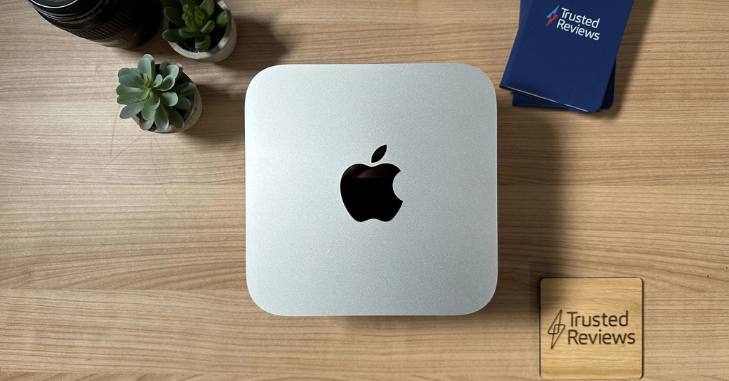
This configuration allows for seamless multitasking and enhanced graphics performance, making it suitable for a wide range of applications, from everyday tasks to more demanding creative work.
Memory and Storage
- RAM: Starts at 8GB of unified memory, upgradeable to 24GB
- Storage: Options range from 256GB to 2TB SSD
The unified memory architecture ensures fast access to data, while the SSD options provide ample storage space for files and applications.
Connectivity
The Mac Mini M2 offers a robust array of connectivity options:
- Wi-Fi 6E: Ensures fast wireless internet speeds
- Bluetooth 5.3: For connecting peripherals
- Ports:
- Two Thunderbolt 4/USB-C ports
- Two USB-A ports
- HDMI port
- Gigabit Ethernet port
- 3.5mm headphone jack

These features make it easy to connect multiple devices and peripherals, enhancing the versatility of the Mac Mini M2.
Features
Design and Build
The Mac Mini M2 upholds the sleek and minimalist design that Apple is renowned for, featuring dimensions of 1.41 inches (3.58 cm) in height and 7.75 inches (19.70 cm) in width and depth. Weighing 2.6 pounds (1.18 kg), its compact size allows it to fit easily on any desk or workspace without occupying much room.
This combination of elegant design and practicality makes the Mac Mini M2 an ideal choice for users looking to maximize their productivity stylishly.
Operating System
The Mac Mini M2 comes pre-installed with macOS Ventura, which offers a seamless user experience thanks to its array of features. Users benefit from improved multitasking capabilities, enhanced security features, and seamless integration with other Apple devices.
This operating system provides a stable and intuitive platform, making it suitable for both personal and professional use, ensuring that users can navigate their tasks efficiently while enjoying robust security and connectivity with their Apple ecosystem.
Display Support
The Mac Mini M2 supports up to two displays simultaneously, allowing users to enhance their productivity with multiple screens. It can drive one display at an impressive 6K resolution via Thunderbolt while supporting a second display at up to 5K resolution through either HDMI or Thunderbolt.
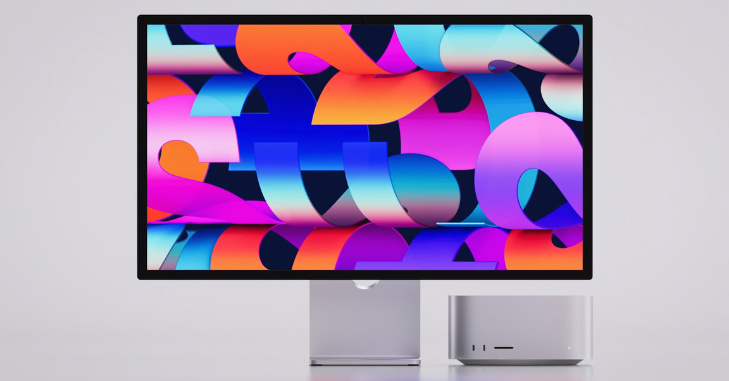
This capability makes the Mac Mini M2 an excellent choice for users who need expanded screen real estate for tasks such as multitasking, creative work, or data analysis.
Energy Efficiency and Long-Term Value
Another noteworthy advantage of the Mac Mini M2 is its exceptional balance between power efficiency and sustained performance. Built on Apple’s advanced silicon architecture, the device delivers high-speed computing while consuming far less energy than many comparable desktop systems.
This makes it particularly appealing for users who rely on their machines for extended work sessions, such as freelancers, remote professionals, and students. Lower power consumption not only reduces electricity costs but also contributes to a cooler and quieter working environment.
Performance
Everyday Use
In everyday tasks such as web browsing, document editing, and media consumption, the Mac Mini M2 performs exceptionally well. Its powerful CPU ensures smooth operation even with multiple applications running simultaneously.
Creative Workflows
For creative professionals, the Mac Mini M2 offers impressive performance in tasks such as video editing, graphic design, and audio production. The M2 chip’s enhanced GPU capabilities allow for faster rendering times and smoother playback of high-resolution content.

Gaming
While not primarily designed as a gaming machine, the Mac Mini M2 can handle many popular games in moderate settings. Its GPU provides sufficient power for casual gaming experiences.
User Reviews
Positive Feedback
Users have praised the Mac Mini M2 for its impressive performance, highlighting its fast processing speeds and smooth multitasking capabilities. Additionally, the device’s compact size and elegant appearance have garnered positive feedback, making it an attractive addition to any workspace.
Moreover, many users appreciate the value it offers, as it delivers high performance at a relatively affordable price point compared to other Apple products.
Areas for Improvement
Some users have highlighted a few areas where the Mac Mini M2 could improve. One common concern is the limited number of USB-C ports, which may require additional hubs for users with extensive peripheral needs.
Another drawback is its lack of upgradability, as the RAM is soldered onto the motherboard, preventing post-purchase upgrades. Despite these minor limitations, the Mac Mini M2 has received overwhelmingly positive feedback overall, thanks to its performance, design, and value.
Comparison with Competitors
1. Mac Mini M2 vs. Mac Studio
While the Mac Mini M2 caters to general users and professionals, the Mac Studio targets power users with more demanding needs, offering higher performance at a steeper price.

2. Mac Mini M2 vs. Intel-Based PCs
Compared to traditional PCs in the same price range, the Mac Mini M2 excels in energy efficiency and overall performance but lacks compatibility with some Windows-exclusive software.
Price and Availability
The base model of the Mac Mini M2 starts at $599, making it an accessible entry point into Apple’s ecosystem. Prices increase with additional RAM and storage options.

Conclusion
The Apple Mac Mini M2 combines powerful performance with a compact design, making it an excellent choice for both personal use and professional workflows. Its robust feature set includes advanced connectivity options, support for multiple displays, and seamless integration with macOS Ventura.
While there are some limitations in terms of upgradeability and port availability, these are minor compared to the overall value offered by this device. For those seeking a powerful yet affordable desktop solution within the Apple ecosystem, the Mac Mini M2 stands out as an exceptional option.
Whether you’re a creative professional needing reliable performance or a casual user looking for a versatile computer that fits neatly into any space—the Mac Mini M2 delivers on all fronts.
Apart from that if you want to know about “Pixel 7a vs 7: Their Similarities and Differences Across Several Key Areas” then please visit our “Technology” Category.
FAQs
The Mac Mini M2 is a compact desktop computer from Apple, powered by the M2 chip, which enhances performance and graphics capabilities compared to its predecessor.
The Mac Mini M2 comes pre-installed with macOS Ventura, which includes improved multitasking features and enhanced security.
It supports up to two displays simultaneously: one at 6K resolution via Thunderbolt and another at 5K resolution via HDMI or Thunderbolt.