Vodafone Home Broadband is Vodafone’s fixed-line internet service in the UK, sold mainly as Full Fibre (fiber all the way to your home) with part-fiber plans where full fiber has not arrived yet. It is usually priced below BT and Sky for similar speeds, includes Vodafone’s own router, and its higher tiers add Wi-Fi boosters and a mobile back-up connection that keeps you online if the line drops.
Whether it suits you depends on what is available at your address, the speed your household actually needs, and how you feel about 24-month contracts with annual price rises. This guide explains how the service is delivered, the plan types, realistic speeds, the equipment, the pricing rules, how to switch and how Vodafone stacks up against the other big UK providers.
How Vodafone Broadband Is Delivered
Vodafone does not build its own street-level broadband network in most areas. It sells broadband over wholesale networks, chiefly Openreach (the same network BT, Sky and TalkTalk use) and CityFibre, an alternative full fiber network available in a growing list of towns and cities. That matters in two ways:
- Availability: if Openreach or CityFibre full fiber reaches your home, Vodafone can usually sell it to you, so coverage is broad across the UK.
- Line performance: the physical connection is the same as other providers on that network. Differences in day-to-day experience come mostly from the router, the provider’s own network capacity at busy times, and customer support.
In 2025 Vodafone UK and Three UK completed their merger, forming VodafoneThree. Existing broadband customers kept their Vodafone service, but brand names and package details may continue to change, so check the current line-up before you buy.

Vodafone Broadband Plan Types
Package names and exact speeds change regularly, but the range generally breaks down like this:
| Plan type | Technology | Typical average download | Good for |
|---|---|---|---|
| Superfast fiber | Fiber to the cabinet, copper to the home | Roughly 35 to 70 Mbps | Smaller households, browsing, HD streaming |
| Entry full fiber | Full fiber to the premises | Around 70 to 150 Mbps | Families streaming and video calling at once |
| Mid-tier full fiber | Full fiber | Several hundred Mbps | Home workers, gamers, large downloads |
| Gigabit full fiber | Full fiber | Around 900 Mbps and above where available | Busy households, creators, future-proofing |
Vodafone has typically offered two versions of each speed: a standard plan and a “Pro” plan that adds extras such as Wi-Fi boosters and a mobile back-up connection. Upload speeds on full fiber are usually much higher than on part-fiber, which helps with video calls, sending large files and cloud backups.
How Much Speed Do You Actually Need?
Many households pay for more speed than they use. As a practical guide:
- One or two people, browsing and HD streaming: an entry-level plan is usually enough.
- A family streaming on several screens at once: an entry or mid-tier full fiber plan avoids buffering at peak times.
- Home workers with frequent video calls: prioritize upload speed and reliability, which favors full fiber, and consider a plan with mobile back-up.
- Gamers and creators uploading large files: mid-tier or gigabit plans make the biggest difference here, especially for upload times.
If your Wi-Fi is weak, a faster line will not fix it. In that case, spending on better in-home coverage often brings a bigger improvement than upgrading the plan.
Guaranteed Minimum Speeds
Under Ofcom’s rules, providers must give you a personalized estimate and a minimum guaranteed speed before you sign. If your speed falls below it and the provider cannot fix the problem within a set period, you may be able to leave the contract without penalty. Save that figure along with your contract summary.
Router, Wi-Fi and Back-Up Connection
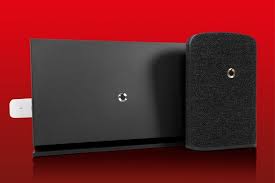
All plans come with a Vodafone router, known on recent packages as the Ultra Hub. It supports modern Wi-Fi standards and is managed through the Vodafone Broadband app, where you can change the network name and password, see connected devices and set up parental controls.
The Pro-style plans add two features worth understanding:
- Super Wi-Fi: mesh boosters that spread coverage to rooms the main router cannot reach, useful in larger or thick-walled homes.
- Mobile back-up: if the fixed line fails, the service switches to a mobile data connection so you stay online, often with a limited data allowance. This is valuable if you work from home.
You can use your own router instead, particularly on full fiber, but you may lose support for features such as the back-up connection. If Wi-Fi rather than the line is your bottleneck, our guide to signs your router needs an upgrade explains what to look for, and our eero 7 Pro review covers a popular third-party mesh option.
Prices, Contracts and Annual Rises
Vodafone’s pricing tends to sit toward the value end among the big-name providers, with frequent deals on full fiber. Most plans are 24-month contracts. Check these points before signing:
- Mid-contract price rises: since January 2025, Ofcom has required providers to set out any in-contract price rise in pounds and pence at the point of sale, rather than as a percentage linked to inflation. Your contract summary shows exactly how much the monthly price rises each April.
- Upfront and set-up costs: some deals include a one-off fee. Compare the total cost over the whole contract, not just the headline monthly figure.
- Out-of-contract pricing: when the minimum term ends, prices can rise. Providers must notify you, and that is the right moment to renegotiate or switch.
- Mobile bundles: Vodafone mobile customers may be offered discounts or extras for combining services.
- Social tariff: Vodafone has offered a lower-cost “Essentials” broadband plan for households receiving certain benefits such as Universal Credit. Eligibility rules apply.
How to Work Out the True Cost
A simple way to compare deals is to calculate the total you will pay over the full contract. Add the upfront fee, the monthly price for the months before the first April rise, and the higher price for the months after it. Do the same for the next year’s rise. Dividing that total by the number of months gives an effective monthly price that you can compare fairly across providers, even when their offers are structured differently.
How Vodafone Compares With Other UK Providers
| Provider | Main network | Typical strengths | Things to weigh |
|---|---|---|---|
| Vodafone | Openreach and CityFibre | Competitive full fiber pricing, mobile back-up on higher tiers | Customer service ratings have varied over time |
| BT | Openreach | Strong router and Wi-Fi guarantees, hybrid back-up options | Often more expensive |
| Sky | Openreach | TV bundles | Best value mostly when bundled with TV |
| Virgin Media | Own cable and fiber network | Very high top speeds in its footprint | Availability limited to its network |
| Smaller full fiber networks | Their own networks | Often symmetrical speeds and simple pricing | Coverage limited to specific areas |
For independent views on reliability and service, check Ofcom’s annual customer service reports and consumer groups such as Which?, since performance and complaint levels shift from year to year.
Pros and Cons of Vodafone Home Broadband
| Pros | Cons |
|---|---|
| Competitive pricing on full fiber | 24-month contracts are the norm |
| Wide availability via Openreach and CityFibre | Fixed annual price rises each April |
| Mobile back-up and boosters on higher tiers | Customer service reviews have been mixed |
| App-based router management | No major TV bundle like Sky or Virgin Media |
How to Switch to Vodafone Broadband
- Check availability: enter your postcode and address on Vodafone’s site to see which speeds are available at your property.
- Check your current contract: leaving early can trigger exit fees, so find your end date first.
- Order the new plan: under Ofcom’s One Touch Switch process, your new provider handles the switch between most providers, and you do not need to contact your old one to arrange the move.
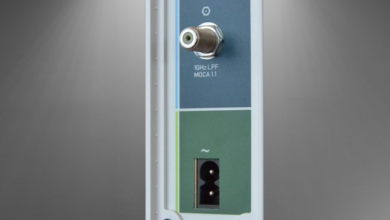
- Installation: part-fiber switches are usually done remotely. New full fiber often needs an engineer visit to fit an optical network terminal inside your home.
- Set up and test: connect the router, update Wi-Fi details on your devices and run a speed test on a wired connection to check you are getting at least the guaranteed minimum.
You also have a 14-day cooling-off period after signing up remotely, which lets you cancel if something is not right.
Getting the Best From Your Vodafone Connection
Most “slow broadband” complaints turn out to be Wi-Fi problems inside the home rather than faults on the line. A few simple checks usually make a noticeable difference:
- Place the router well: put it in a central, raised spot, away from microwaves, fish tanks, mirrors and thick walls, and not tucked inside a cupboard.
- Use cables for fixed devices: game consoles, smart TVs and desktop PCs get steadier speeds over Ethernet than over Wi-Fi.
- Test fairly: run speed tests on a wired device at different times of day before reporting a fault, and keep the results as evidence if you need to claim against your guaranteed minimum speed.
- Restart after outages: Vodafone routers update automatically, but a restart can clear persistent issues after a fault.
- Add mesh coverage if needed: in larger homes, boosters or a mesh system fix dead zones more effectively than paying for a faster line.
If a genuine fault persists, report it through the app, which can run line tests remotely. If a complaint is not resolved within eight weeks, or you receive a deadlock letter, you can take it to the independent ombudsman scheme your provider belongs to, free of charge.
Bottom Line: Is Vodafone Home Broadband a Good Choice?
It is a strong option if you want full fiber at a keen price and value the mobile back-up on higher plans, particularly for working from home. It is less compelling if you want bundled TV, if you live in a Virgin Media or alternative-network area with faster speeds for the money, or if customer service reputation is your top priority. Whatever you choose, compare the full contract cost, including the set price rises, and note your guaranteed minimum speed before committing.
Frequently Asked Questions
What network does Vodafone broadband use?
Vodafone sells broadband mainly over the Openreach network and, in some towns and cities, the CityFibre full fiber network. The physical line is shared with other providers on the same network.
How fast is Vodafone Home Broadband?
Speeds range from part-fiber plans averaging tens of Mbps up to full fiber plans of around 900 Mbps or more. What you can get depends on your address and the package you choose.
Does Vodafone broadband go up in price every year?
Most contracts include an annual April rise. Under Ofcom rules in force since January 2025, that rise must be shown in pounds and pence when you sign.
What happens if my Vodafone broadband goes down?
On plans with mobile back-up, the router switches to a mobile data connection so you stay online. On other plans, report the fault through the app or support line so it can be tested remotely.
Can I use my own router with Vodafone?
Often yes, especially on full fiber. You may lose features such as the mobile back-up and some support options, so weigh that before swapping the Ultra Hub.
Do I need an engineer visit to switch to Vodafone?
Not always. Part-fiber switches are usually completed remotely, while new full fiber connections often need an engineer to install an optical network terminal in your home.