Choosing the right server rack starts with more than counting your devices. Consider equipment height, depth, weight, cooling, power, security, and future expansion. A good setup keeps hardware organized while making maintenance and upgrades much easier.
| Server Rack | What to check | Why it matters |
|---|---|---|
| Rack height | Total equipment U requirements | Determines how much hardware fits |
| Mounting width | 19-inch compatibility | Supports standard rack-mounted equipment |
| Depth | Deepest device plus cable clearance | Prevents blocked doors and strained cables |
| Load capacity | Total equipment weight | Protects the frame and mounted hardware |
| Cooling | Airflow direction and ventilation | Reduces heat buildup |
| Rack design | Open, enclosed, 2-post, or 4-post | Changes access, support, and security |
| Power | PDU and UPS requirements | Keeps equipment powered and organized |
| Expansion | Unused capacity | Provides room for future hardware |
Quick answer: Most modern IT equipment uses a standardized 19-inch mounting format. Rack height is measured in rack units, with 1U equaling 1.75 inches. The right configuration depends on equipment depth, weight, airflow, security, power distribution, available space, and expected growth.
What Is a Rack, and What Does It Do?
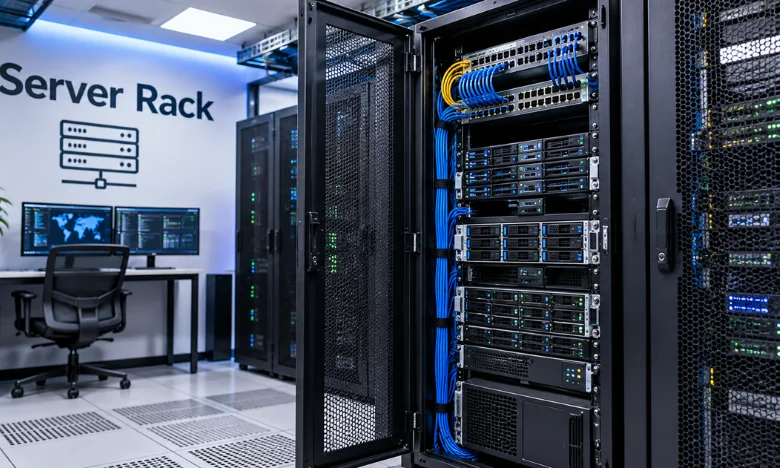
A rack is a standardized frame or cabinet designed to hold servers and networking equipment vertically. Common equipment includes switches, patch panels, storage systems, UPS units, and other rack-mounted hardware. Centralizing these devices makes cabling, cooling, troubleshooting, and physical access easier.
Most enterprise installations use the 19-inch mounting format defined by industry rack standards. The measurement describes the mounting area, not the cabinet’s full exterior width. Equipment from different manufacturers can therefore share compatible mounting rails. Racks appear in data centers, server rooms, network closets, offices, and home labs. Large facilities may use rows of full-height cabinets containing dozens of devices. Smaller offices may need only a compact floor-standing or wall-mounted enclosure.
Understanding Rack Units and Common Sizes
Rack height is measured in rack units, commonly written as U or RU. One rack unit equals 1.75 inches, or 44.45 millimeters. A 2U device therefore occupies 3.5 inches of vertical mounting space. A 42U cabinet provides 73.5 inches of mounting height inside the usable rail area. Smaller options include 6U, 12U, 18U, and 24U configurations. Larger 45U and 48U models are also common in higher-density environments.
The U rating does not describe rack depth. A 42U cabinet can still be too shallow for a deep storage server. Always check height and depth separately before purchasing hardware.
Open Frame, Enclosed, 2-Post, or 4-Post?
Rack terminology can become confusing because two design decisions often overlap. “Open versus enclosed” describes whether doors and side panels surround the hardware. Two-post versus four-post describes how equipment is physically supported.
| Type | Main advantages | Main limitations | Common use |
|---|---|---|---|
| 2-post open frame | Low cost, easy access | Limited support for deep equipment | Switches and patch panels |
| 4-post open frame | Better equipment support, strong airflow | No locked enclosure | Secure IT rooms and labs |
| Enclosed cabinet | Physical security and controlled access | More space and airflow planning is needed. | Offices and shared spaces |
| Wall-mounted enclosure | Saves floor space | Limited depth and weight capacity | Small network closets |
Two-post frames generally suit lighter networking and telecommunications equipment. Four-post designs support equipment at both front and rear mounting points. Deep servers, storage hardware, and UPS systems commonly benefit from four-post support. Enclosed cabinets add doors, side panels, and often locking hardware. They can protect equipment where employees or visitors share the surrounding space. Open frames provide easier physical access and fewer barriers to room-level airflow.
How to Choose a Server Rack for Your Equipment
Start by inventorying everything you expect to install. Include servers, switches, patch panels, UPS hardware, storage systems, and cable-management accessories. Then record each device’s height, depth, weight, mounting method, and power requirements.
Use these checks before selecting a rack:
- Add the U requirements for every planned device.
- Measure your deepest chassis rather than relying on height alone.
- Leave rear clearance for connectors, power cables, and cable-management arms.
- Confirm the rack’s published static load capacity.
- Check whether your rail kits need square, round, or threaded mounting holes.
- Plan where PDUs, UPS units, and network cabling will sit.
- Leave practical expansion space for equipment you may add later.
Future capacity matters because replacing a full cabinet can disrupt cabling and power distribution. Eaton describes racks as long-life infrastructure compared with frequently replaced computing equipment. Selecting enough capacity now can therefore reduce unnecessary physical changes later.
Depth Can Matter More Than Height
Depth is one of the easiest specifications to underestimate. A chassis may technically fit, while its connected cables prevent the rear door from closing. Cable bends and management arms can require meaningful clearance behind the equipment. Measure from the front mounting position through the deepest installed device. Then account for power connectors, network cables, and service access behind that device. Check usable internal depth because outside cabinet dimensions may not accurately reflect mounting clearance.
Deep equipment is especially common among storage servers and powerful compute systems. Shallow networking hardware usually gives you more flexibility. Matching cabinet depth to your deepest device prevents expensive installation surprises.
Check Weight Capacity and Mounting Rails
Rack capacity involves more than available U space. Servers, storage arrays, batteries, and UPS systems can become heavy when combined. The cabinet’s rated load must support the complete installed configuration. Heavy equipment should generally sit lower in a floor-standing cabinet. This placement helps maintain a lower center of gravity and makes lifting less demanding. Manufacturer mounting instructions should still determine the final location for specific hardware.
Rail compatibility deserves equal attention. Some servers use sliding rail kits designed for particular mounting-hole styles and rack depths. Confirm those requirements before assuming every rail kit fits every cabinet.
Plan Cooling and Airflow Before Installation
Modern servers generate heat continuously during operation. Poor airflow can raise equipment temperatures even when the room itself feels comfortable. Rack layout should support each device manufacturer’s intended intake and exhaust direction. Many servers move cool air from front to back. Perforated doors can support that pattern inside enclosed cabinets. Open frames instead depend more heavily on the cooling conditions of the surrounding room.
Unused rack spaces can also affect airflow in enclosed environments. Blanking panels help prevent unwanted air recirculation through empty mounting positions. Avoid blocking exhaust paths behind active equipment with cable bundles. Temperature problems can also appear around networking hardware. Techrolab’s guide to signs your router needs an upgrade covers overheating as a potential hardware concern. That guide is useful when evaluating equipment already operating inside your network environment.
Power Distribution and Cable Management

Plan power before equipment enters the cabinet. Rack PDUs distribute electricity to mounted hardware while keeping connections organized. Vertical models can preserve horizontal mounting space when the cabinet supports them. UPS placement also affects weight and available capacity. Heavy battery-backed equipment usually requires suitable four-post support and adequate load ratings. Keep power cables separated and organized enough for technicians to trace connections safely.
Network cabling requires similar planning. Vertical and horizontal cable managers can reduce congestion around switches and patch panels. Clean routing also keeps cables away from airflow paths and simplifies hardware replacement. Your wider network design can affect these decisions. Techrolab’s DOCSIS 3.0 versus 3.1 comparison provides additional background on modern network connectivity. The router-upgrade guide mentioned above can also help when reviewing aging network hardware.
Security and Placement Matter Too
Physical security becomes more important when hardware sits outside a locked IT room. An enclosed cabinet can restrict access through locking front and rear doors. Removable side panels should also have appropriate access controls in shared environments. Consider the surrounding space before choosing cabinet dimensions. Technicians need enough room to open doors, remove equipment, and reach rear connections. Floor loading and anchoring requirements may also matter for large, heavily populated installations.
Noise can influence placement in regular offices. Servers and networking hardware may contain several high-speed fans. Moving equipment into a dedicated technical area can improve both working conditions and physical security.
Match the Rack to the Hardware Inside It
The rack is only one part of an infrastructure system. Storage drives, network interfaces, power equipment, servers, and switches must still work together. Planning these components as a system reduces compatibility problems later. Hardware specifications also matter when upgrading individual systems. Techrolab’s M.2 guide explains how physical size alone does not guarantee storage compatibility. The same principle applies to rack hardware, where dimensions, interfaces, rails, and clearances all matter.
Avoid buying solely by cabinet height or appearance. Start with your actual equipment measurements and operating environment. Then choose the smallest practical configuration that still leaves useful capacity for expected changes.
Choose Around Your Equipment, Not the Cabinet
A well-planned rack makes equipment easier to install, cool, power, secure, and maintain. Measure your hardware first, then compare height, depth, load capacity, airflow, and mounting requirements. Before buying, document your current equipment and the additions you realistically expect over the life of the installation.
Frequently Asked Questions
What size server rack do I need?
Add the U height of every device you plan to install. Include switches, patch panels, UPS hardware, and cable-management components. Leave additional capacity if you expect the installation to grow.
Is 42U a standard rack size?
Yes, 42U is a widely used full-height configuration in data centers and server rooms. Its mounting area equals 73.5 vertical inches. Other common configurations include 24U, 45U, and 48U.
Is a 2-post rack suitable for servers?
It depends on the hardware and the manufacturer’s mounting requirements. Many deep or heavy servers need four-post rails with front and rear support. Two-post frames are more commonly used for switches, patch panels, and lighter telecom equipment.
What is the difference between a rack and a cabinet?
A rack may describe an open structural frame without doors or side panels. A cabinet surrounds the mounting structure with panels and usually doors. Both can use standardized rails for compatible IT equipment.
How much depth should I allow?
Start with the depth of your deepest planned device. Then allow space for power connections, network cables, and required service clearance. Never assume the cabinet’s outside depth equals its usable mounting depth.