Best Minecraft Mods: Complete Guide to 15 Essential Java Edition Mods for Performance, Exploration, Building & Survival

Minecraft can already keep you busy for hundreds of hours, but the right mods can make exploration, building, automation, inventory management, and performance noticeably better. The challenge is no longer finding Minecraft mods; it is deciding which projects are useful enough to deserve a permanent place in your setup. This guide narrows the field to 15 strong choices for Java Edition players in 2026, ranging from lightweight quality-of-life improvements to mods that can reshape an entire world.
Quick answer: The best Minecraft mods in 2026 include Sodium for performance, JEI for recipes, Jade for block information, Xaero’s Minimap for navigation, Create for automation, and Terralith for exploration. The right setup depends on your Minecraft version and whether you use Fabric, Forge, or NeoForge.
Best Minecraft Mods at a Glance
| Minecraft mod | Best for | What it changes |
| Sodium | Performance | Improves rendering performance |
| Iris Shaders | Graphics | Adds modern shader support |
| Just Enough Items (JEI) | Crafting | Makes recipes and items easier to find |
| Jade | Information | Shows details about blocks and entities |
| Xaero’s Minima | Navigation | Adds a minimap and waypoints |
| Mouse Tweaks | Inventory | Speeds up inventory management |
| Waystones | Travel | Adds convenient teleportation points |
| Sophisticated Backpacks | Storage | Adds expandable portable storage |
| Create | Automation | Adds mechanical machines and contraptions |
| Biomes O’ Plenty | World generation | Expands biome variety |
| Terralith | Exploration | Dramatically changes Overworld terrain |
| Farmer’s Delight | Survival | Expands farming and cooking |
| Nature’s Compass | Exploration | Helps locate specific biomes |
| Distant Horizons | Visual distance | Extends the visible landscape |
| ModernFix | Performance | Reduces memory use and fixes performance issues |
Are These Minecraft Java or Bedrock Mods?
This list focuses on Minecraft: Java Edition, which remains the main edition for traditional community-created mods. Mojang describes Java Edition as the better option for extensive modding, while Bedrock Edition uses Add-Ons, resource packs, and Marketplace content instead. Bedrock Add-Ons can still add custom blocks, mobs, recipes, items, and mechanics, but installing the Java projects below directly into Bedrock is not the same process.
Version matching also matters more than many new players expect. Minecraft Java 26.2 was released on June 16, 2026, while development has since moved into 26.3 snapshots, and individual mod developers update at their own pace. A mod that is excellent on 1.21.1 or 26.1.2 does not automatically work on 26.2, so check the exact game version and loader listed on its download page before installing it.
If you are returning to Minecraft after a long break, Techrolab also has a practical Minecraft book crafting guide covering books, paper, bookshelves, and related survival basics. That type of vanilla knowledge is still useful even after you begin adding mods, because most good mods expand Minecraft rather than replacing its core systems. You can also browse the broader Techrolab Gaming section for more gaming guides.
How We Chose the Best Minecraft Mods for 2026
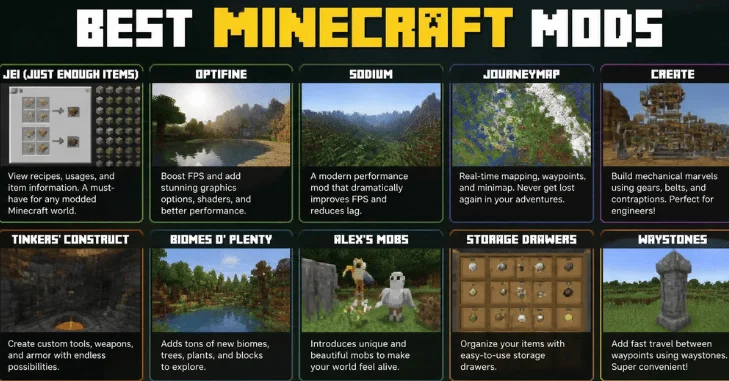
A huge download count alone does not make a mod worth installing, because dependency libraries can accumulate enormous totals without changing gameplay directly. For this guide, usefulness, active development, compatibility coverage, reputation, and the amount of meaningful improvement each mod offers were more important. Curse Forge currently lists hundreds of thousands of Minecraft projects, which makes careful filtering much more useful than simply choosing whatever appears first.
We also favored a mix that works for different types of players rather than creating a list dominated by one category. Some picks improve FPS or memory use, others make survival less tedious, and several add significant exploration or engineering systems. This approach gives you a foundation from which you can build a small vanilla-plus setup or a much larger customized installation.
1. Sodium: Best Minecraft Mod for Better Performance
Sodium is one of the easiest recommendations for players who want Minecraft to render more efficiently without turning it into a different game. The project focuses on rendering optimization and currently supports Fabric and NeoForge, with recent files available for modern releases, including 26.2. It is especially useful when you want smoother gameplay before adding visual upgrades or larger content mods.
Sodium is also a sensible first install for PCs that struggle with higher render distances, busy bases, or large mod collections. Performance gains vary by hardware and the rest of your mod list, so no single FPS increase should be promised for every computer. Treat it as the foundation of a performance-focused setup and test your frame rate before stacking additional optimizations.
2. Iris Shaders: Best for Better Minecraft Graphics
Iris Shaders is designed to bring modern shader support to Minecraft while working alongside the Sodium ecosystem. It supports popular shader packs and currently has Fabric, Quilt, and NeoForge builds, including releases for current 2026 Java branches. That makes it a strong choice for players who want upgraded lighting, shadows, water, skies, and atmosphere without relying on an older all-in-one graphics solution.
Shaders can be demanding, so Iris is most useful when your computer already runs the base game comfortably. Start with a lightweight shader pack and monitor frame rate before moving to cinematic presets with expensive shadows and reflections. Combining Iris with Sodium gives you more flexibility to balance appearance against performance.
3. Just Enough Items (JEI): Best for Recipes and Crafting
Just Enough Items, better known as JEI, solves one of the biggest problems that appears after installing content-heavy mods: remembering hundreds or thousands of recipes. It provides searchable item and recipe information directly inside the inventory interface, making it much easier to learn unfamiliar materials and crafting chains. JEI remains enormously established and was updated again in September 2026, with current files covering Fabric and NeoForge as well as older Forge releases.
JEI becomes even more valuable when you install mods such as Create or Farmer’s Delight because those projects introduce many new items and production steps. Instead of repeatedly leaving the game to search for recipes, you can investigate most crafting paths while playing. For a larger modded survival world, JEI is less of a luxury and more of a basic usability tool.
4. Jade: Best for Understanding Blocks and Mobs
Jade adds an information overlay that tells you what you are looking at, which is extremely convenient in a game filled with unfamiliar modded blocks and machines. Depending on the target, it can display useful information without requiring you to open menus or remember every block from every installed project. Current builds cover Fabric, Quilt, NeoForge, and Forge across a wide range of Minecraft versions.
Jade can run on the client for basic functionality, although its project documentation notes that some information requires server-side installation as well. It also integrates with JEI for additional recipe-related functions, which makes those two mods a particularly useful combination. Players building their first serious modpack should consider installing both early rather than adding them after confusion sets in.
5. Xaero’s Minimap: Best Minecraft Navigation Mod
Xaero’s Minimap places a configurable map in the corner of your screen and lets you create waypoints for important locations. That sounds simple until you start exploring thousands of blocks from home, searching for structures, or maintaining several bases in the same world. The project supports Forge, Fabric, Quilt, and NeoForge and has builds covering Minecraft 26.2 and numerous earlier releases.
Waypoints are particularly useful after a death, during long exploration trips, or when you need to remember portals, villages, farms, and resource sites. The minimap can also make multiplayer navigation easier, although server rules should always be respected before using mapping features competitively. For ordinary survival, it removes a lot of unnecessary coordinate memorization without eliminating exploration itself.
6. Mouse Tweaks: Best Small Quality-of-Life Upgrade
Mouse Tweaks changes inventory interactions in ways that feel minor until you return to a game without it. It improves mouse dragging and allows faster item movement, including useful scroll-wheel behavior for transferring stacks. The mod remains actively available across Forge, Fabric, and NeoForge, with 26.2 builds released in June 2026.
This is a good example of a mod that does not need new biomes, enemies, or machines to improve Minecraft. Players who organize large storage rooms or repeatedly move resources between inventories can save a surprising amount of repetitive clicking. Because it is client-side, it is also simpler than many large content additions.
7. Waystones: Best for Fast Travel
Waystones introduces physical teleportation points that can connect distant locations around your world. Players can use waystones and related teleportation items instead of repeating the same several-thousand-block trip between a base, village, mine, or exploration area. Current releases support Fabric, Forge, and NeoForge, although the project also requires supporting dependencies such as Balm and, on newer versions, Shogi.
The biggest advantage is that fast travel still feels like something you build into the world rather than a cheat command. Server owners can also configure how available teleportation should be, which makes the mod useful for both solo survival and community hubs. If long-distance travel has become more tedious than adventurous, Waystones is one of the most practical fixes.
8. Sophisticated Backpacks: Best Portable Storage Mod
Sophisticated Backpacks gives players expandable storage that can travel with them instead of forcing constant returns to a chest room. Its backpacks have multiple tiers and can accept functional upgrades, allowing the storage system to grow alongside the player. Recent releases cover NeoForge and Forge, including modern 2026 game versions.
Portable storage is particularly useful during mining sessions, structure looting, and large construction projects where inventory space disappears quickly. The ability to upgrade a backpack also makes it feel like progression rather than a one-time shortcut around Minecraft’s inventory limits. Players who collect almost everything they encounter will probably appreciate this mod more than minimalists.
9. Create: Best Minecraft Mod for Automation
Create is one of the most distinctive technology mods because its machines are built around visible mechanical systems rather than endless static menus. Gears, moving components, contraptions, processing systems, and automation tools encourage players to design machines that are both functional and visually interesting. Its in-game Ponder system also provides visual explanations of mechanics instead of expecting every player to learn from an external wiki.
There is an important compatibility warning for players using the newest Minecraft branch. The official Create project page currently lists its modern main release for Minecraft 1.21.1 on NeoForge rather than 26.2, so you should choose your Minecraft version around Create if this mod is central to your planned world. That limitation is worth accepting for many engineering-focused players because Create can become the foundation of an entire long-term survival playthrough.
10. Biomes O’ Plenty: Best for More Biome Variety
Biomes O’ Plenty expands world generation with more than 50 additional biomes plus associated trees, plants, and environmental variety. It is aimed at players who enjoy the normal exploration loop but want substantially more landscape diversity when starting a new world. Current releases cover Forge, Fabric, and NeoForge, including Minecraft 26.2 builds.
This mod works best when discovery is a major part of why you play Minecraft. New terrain and vegetation can make travel feel less repetitive without requiring a completely different progression system. It is also a natural choice for builders who want a wider selection of landscapes around which to design towns, bases, and themed structures.
11. Terralith: Best for Dramatic Overworld Exploration
Terralith is another world-generation favorite, but its appeal is strongly tied to reshaping the scale and character of the Overworld. It introduces extensive terrain and biome changes designed to make exploration feel more dramatic while still working within Minecraft’s recognizable world structure. The project has current Fabric and NeoForge releases for Minecraft 26.2 and supports several other loaders and older versions as well.
Terralith is especially effective when you want memorable mountains, valleys, forests, and other large-scale scenery to become part of the adventure. Builders also benefit because unusual terrain creates more distinctive locations for castles, villages, bridges, and hidden bases. Start a fresh world when making major world-generation changes so the terrain can generate consistently from the beginning.
12. Farmer’s Delight: Best for Cozy Survival and Cooking
Farmer’s Delight expands Minecraft’s farming and food systems with a stronger emphasis on cooking and preparing meals. It fits naturally into slower survival worlds where building a farm, kitchen, or village economy is part of the appeal instead of merely a way to refill the hunger bar. The project remains very popular and was updated in August 2026.
Compatibility is the main detail to check before choosing it for a new installation. Its current primary release targets Minecraft 1.21.1 on NeoForge rather than the newest 26.2 branch, so players committed to Farmer’s Delight may want a stable 1.21.1 modded instance. In return, it provides a more developed food loop without transforming Minecraft into an entirely different survival game.
13. Nature’s Compass: Best for Finding Specific Biomes
Nature’s Compass adds an item that helps locate biomes, which is invaluable once your world contains a large number of vanilla or modded environments. You can search for the biome you need and use the resulting location information instead of wandering randomly for hours. Current releases support Forge, Fabric, and NeoForge, including builds for Minecraft 26. 2.
It pairs particularly well with large world-generation mods because adding biome variety also makes finding one specific environment more difficult. The compass keeps exploration purposeful without teleporting you directly to the destination. For builders hunting a perfect biome for a project, it can eliminate one of the most frustrating parts of starting a new base.
14. Distant Horizons: Best for Huge Viewing Distances
The mod currently supports Fabric, Forge, and NeoForge and has builds for recent Minecraft versions, including 26.2. The effect is especially impressive from mountains, towers, cliffs, and large builds where Minecraft’s normal view distance can hide much of the surrounding landscape. Results still depend on your hardware and configuration, so increasing every setting immediately is not necessarily the best approach. Pairing sensible Distant Horizons settings with performance-oriented mods can produce a much grander-looking world while keeping the game playable.
15. ModernFix: Best All-Round Optimization Companion
ModernFix targets a broader collection of technical improvements, including memory use, performance problems, and bug fixes. It is designed to work alongside other popular performance mods rather than forcing players into an entirely separate optimization ecosystem. The project has hundreds of millions of downloads and was still receiving updates at the end of August 2026.
Its current compatibility deserves the same careful checking as every other optimization tool. The latest project files presently focus on Minecraft 26.1.2 and several earlier branches rather than offering the same coverage as Sodium on 26.2. If your chosen game version is supported, ModernFix is a strong candidate for larger installations where startup behavior and memory efficiency matter as much as raw frame rate.
Which Minecraft Mods Should You Install First?
New mod users should resist the temptation to download 100 projects in one session because troubleshooting becomes much harder when everything changes at once. A sensible starter combination is Sodium, JEI, Jade, Mouse Tweaks, and Xaero’s Minimap, followed by one or two content mods once the base setup is stable. This gives you performance, recipes, better information, easier inventory controls, and navigation without radically changing progression.
Exploration-focused players can then add Terralith, Nature’s Compass, Waystones, and Distant Horizons, while builders and engineers may prefer Create and Sophisticated Backpacks. Cozy survival players are more likely to enjoy Farmer’s Delight and Biomes O’ Plenty, assuming the required versions align with the rest of the installation. There is no universal perfect mod list because loader support, game version, hardware, multiplayer rules, and personal play style all affect the best combination.
How to Install Minecraft Mods Safely
Installing Java mods is much easier than it used to be, but version mismatches remain one of the most common reasons a modded game fails to launch. The Minecraft version, mod version, loader, and required dependency mods must all agree with each other. Mojang also advises caution around third-party Java content, so obtaining files from established project pages is preferable to downloading unfamiliar reuploads or mirrors.
- Back up your world. Copy important saves before changing loaders, world-generation mods, or major mod collections.
- Choose one Minecraft version. Do not assume a mod built for 1.21.1, 26.1.2, or 26.2 can be moved between those versions.
- Choose the correct loader. Check whether each project needs Fabric, Forge, NeoForge, Quilt, or another supported loader.
- Read dependencies. Mods such as Waystones can require additional libraries that must be installed alongside the main file.
- Download from the official project listing. Avoid sites that repackage or rename files without clear permission from the developer.
- Add a few mods at a time. Launch the game after each small batch so a broken or conflicting project is easier to identify.
- Test a separate world first. World-generation changes deserve particular care because removing them later can leave unusual terrain boundaries or missing content.
You should also avoid building an important long-term world around snapshots unless you specifically want experimental gameplay. Mojang repeatedly warns that testing versions can damage worlds and recommends backups or separate folders for them. A stable Minecraft branch with mature mod support is usually a better foundation for a large modded installation.
Final Verdict
The best Minecraft mods are the ones that solve a real problem or add a type of gameplay you actually want rather than simply making your mods folder larger. Start with reliable quality-of-life and performance improvements, confirm that every project matches your Minecraft version and loader, and then add major world-generation or gameplay systems gradually. With the right combination of Sodium, JEI, Jade, Create, Terralith, Waystones, and other carefully chosen projects, Java Edition can feel fresh again without losing the sandbox freedom that makes Minecraft worth returning to.
Frequently Asked Questions
A strong beginner setup is Sodium, JEI, Jade, Mouse Tweaks, and Xaero’s Minimap because each improves an existing part of Minecraft without completely changing progression. These mods help with performance, recipes, information, inventory management, and navigation. Once that setup works reliably, you can add larger projects such as Create, Terralith, or Biomes O’ Plenty, depending on the type of world you want.
No, the Java mod files listed in this guide should not be treated as Bedrock Add-Ons. Minecraft Bedrock has its own Add-On system for introducing blocks, items, mobs, recipes, and other custom content, including Marketplace options. Players using a console, mobile device, or Bedrock on Windows should look for compatible Bedrock Add-Ons instead.
There is no loader that is automatically best for every player because your preferred mods should determine the choice. Fabric is common among lightweight and performance-oriented projects, while Forge and NeoForge remain important for large content mods, and many projects now publish builds for several loaders. Check every must-have mod first, then select the loader supported by the greatest number of projects in your intended setup.
Some mods can lower FPS because they add complex rendering, world generation, entities, machines, or shader effects. Others, including Sodium and ModernFix, are specifically designed to improve aspects of performance or efficiency. The final result depends on your hardware and the combination of mods, so test performance after each major addition instead of assuming more optimization mods will always be better.
Many mods can be used in multiplayer, but requirements differ between client-side, server-side, and client-and-server projects. Some utilities can work only on your computer, while gameplay mods usually require the server and connected players to use matching versions and dependencies. Always check the project documentation and the server’s rules before joining with a modified client.
For a general Java player, Sodium is arguably the easiest first recommendation because better performance benefits almost every type of world without changing Minecraft’s core progression. JEI is the stronger choice once you begin installing several content mods, while Create offers the biggest gameplay transformation among the projects on this list. The best overall choice therefore depends on whether your biggest priority is performance, convenience, exploration, building, or a completely expanded progression system.