CRT Monitor Guide 2026: How CRT Technology Works, Why Retro Gamers Still Love It, Best Specs to Buy, CRT vs. LCD and OLED

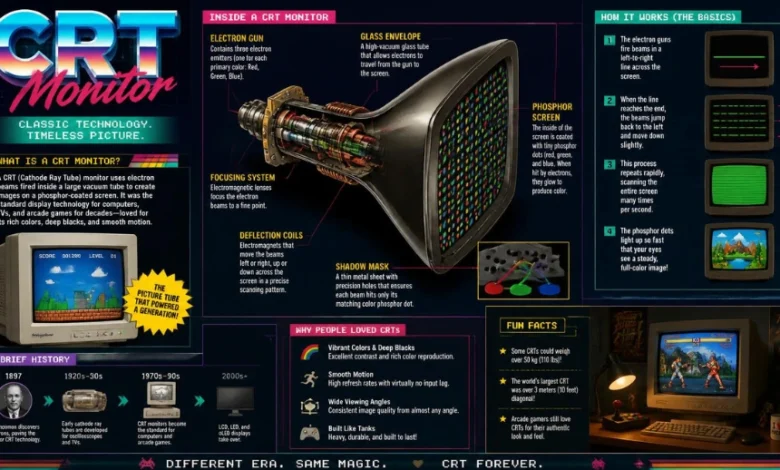
CRT monitors were once the standard way to use a desktop computer, but flat-panel displays pushed them out of everyday offices and homes years ago. In 2026, however, these bulky glass displays still attract retro PC enthusiasts, competitive gamers, collectors, and people who simply prefer the way older games look in motion. For the right setup, a good CRT can offer characteristics that remain difficult to reproduce perfectly on a conventional LCD.
The catch is that buying a CRT today is nothing like shopping for a new monitor at a major retailer. Most available units are decades old, condition varies dramatically, specifications can be confusing, and shipping a heavy glass display creates its own risks. This guide explains how CRT technology works, why people still use it, which specifications matter, how to inspect a used unit, and what US buyers should know about safe ownership and recycling.
What Is a CRT Monitor?
A CRT monitor is a computer display that creates an image by directing electron beams across phosphor-coated glass inside a vacuum tube. Unlike an LCD or OLED, it does not rely on a fixed grid of physical pixels, allowing many CRT computer monitors to display several resolutions and refresh rates without conventional flat-panel scaling.
CRT stands for cathode ray tube, the large vacuum tube that forms most of the monitor’s depth and weight. An electron gun generates and focuses electrons, magnetic deflection steers the beam across the screen, and phosphors emit visible light when struck. Color displays typically use red, green, and blue phosphors to form the picture seen by the viewer.
The underlying display principle dates to the late nineteenth century, with Karl Ferdinand Braun’s early cathode-ray tube work generally traced to 1897. CRT technology later became fundamental to television sets, computer terminals, desktop monitors, oscilloscopes, and other electronic displays throughout much of the twentieth century. Flat panels eventually displaced CRTs in mainstream computing because they are substantially thinner, lighter, and more convenient for modern desks.
How Does a CRT Monitor Work?
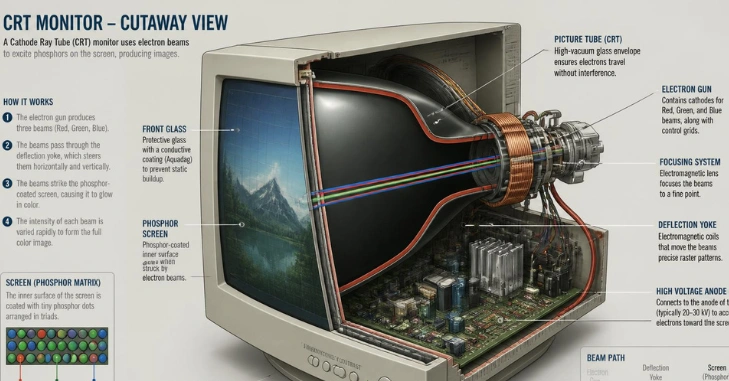
A CRT does not hold a complete image on a permanent pixel grid in the same way an LCD does. Instead, its electron beam repeatedly scans across the phosphor-coated screen, generally working from one side to the other and then progressing down the display. The phosphors glow when energized, and rapid repeated scanning produces the continuous image that the viewer perceives.
This scanning behavior is one reason CRT motion can look distinctive. The display’s light output is tied to the brief illumination and decay of phosphors rather than the sample-and-hold behavior associated with conventional LCD panels. That difference can produce exceptionally clear-looking motion, particularly when a game is running at a stable frame rate that matches the selected refresh rate.
CRT Computer Display vs. CRT TV: They Are Not the Same Thing
A CRT computer monitor and a CRT television may use similar underlying tube technology, but they were designed for different signals and operating conditions. Computer monitors commonly support VGA-style RGB signals, multiple resolutions, and relatively high horizontal scan frequencies, while consumer televisions were designed around broadcast and console-video standards. A CRT TV can therefore be excellent for older consoles without automatically being the right choice for a retro or modern PC.
| Feature | CRT Computer Monitor | Consumer CRT TV |
| Typical use | PCs, workstations, computer gaming | Television, older consoles, video |
| Common connection | VGA; some models use BNC | Composite, S-Video, component, or RF depending on model |
| Resolution flexibility | Usually supports multiple PC resolutions | Built around television video standards |
| Refresh options | Often broader at supported PC resolutions | More dependent on television standard |
| Best fit | Retro PCs, PC games, some emulation | Original retro consoles and period-correct video |
Professional video monitors such as PVMs and BVMs form another category and should not automatically be grouped with ordinary PC CRTs. They can be highly desirable for specialized retro-video setups, but their inputs, supported timings, screen sizes, and prices differ from typical computer monitors. Buyers should decide whether they actually need a computer CRT, television, or professional video monitor before chasing a specific famous model.
Why Do Gamers Still Use CRT Displays?
Excellent motion clarity
Motion is one of the strongest reasons enthusiasts continue using CRT displays. A CRT’s scanning phosphor image behaves differently from an LCD that continuously holds each completed frame until the next refresh, which can make moving objects appear unusually clear. Fast shooters, scrolling games, rhythm titles, and older PC games can therefore feel remarkably fluid on a healthy CRT.
Refresh rate still matters, and a CRT should not be treated as magical simply because it uses a tube. Many later computer monitors can operate at 75 Hz or above at useful resolutions, while lowering the resolution can allow substantially higher refresh rates on capable models. PCWorld’s updated 2026 CRT buying guidance recommends looking at both resolution and refresh capability rather than judging a display by one number alone.
Very little display processing
A conventional computer CRT can accept an analog video signal and begin scanning it without the extensive scaling and image-processing pipeline found in many digital displays. That characteristic helps keep display-side latency extremely low, although calling an entire gaming system literally “zero lag” would be misleading because controllers, software, rendering, synchronization, and signal conversion can all contribute to delay. For latency-sensitive retro gaming, eliminating unnecessary display processing remains a meaningful advantage.
Modern gaming monitors have narrowed this gap significantly, especially at high refresh rates and in low-latency modes. A CRT is therefore not automatically superior to every current gaming display for every game. Readers interested primarily in current consoles can compare the alternative features in Techrolab’s best monitor for Xbox Series X guide before deciding that older hardware is necessary.
Flexible resolutions
CRT computer monitors do not use a single fixed LCD-style native pixel matrix. A capable model can run several supported resolutions and refresh rates while still producing an image directly through the tube’s scanning system. This makes CRTs particularly useful for older PC games and operating systems created around resolutions such as 640 × 480, 800 × 600, or 1024 × 768.
That flexibility should not be confused with unlimited resolution support. Every monitor has horizontal scanning, vertical refresh, bandwidth, focus, and physical sharpness limits, and attempting unsupported timings can cause the image to disappear or fall out of synchronization. The original manual or a trustworthy specification database is therefore valuable whenever the exact model number is available.
A period-correct look for older games
Older games, graphics, fonts, and user interfaces were frequently designed while CRT displays were the expected viewing hardware. Phosphor structure, scan behavior, softer transitions, black levels, and the absence of an LCD’s perfectly rigid pixel grid can change how that material appears. For enthusiasts building a Windows 95, Windows 98, DOS, early Windows XP, or similar retro system, the display can be as important to the experience as the computer itself.
CRT vs. Modern LCD or OLED
A CRT is not a universal upgrade over modern technology. Today’s LCD and OLED monitors dominate for good reasons, including size, efficiency, resolution, connectivity, availability, warranty support, and desk ergonomics. The better choice depends on what the display is expected to do rather than on nostalgia alone.
| Consideration | CRT Display | Modern LCD/OLED |
| Motion clarity | Excellent on a well-configured unit | Excellent on many high-refresh models, but technology varies. |
| Resolution behavior | Multiple supported analog timings | Best at native resolution |
| Input processing | Often minimal | Varies by monitor and mode |
| Desk space | Poor | Excellent |
| Weight | Heavy | Much lighter |
| Power efficiency | Lower | Generally better |
| HDMI/DisplayPort support | Usually requires conversion | Native on current monitors |
| New warranty | Essentially unavailable | Common |
| Retro authenticity | Excellent | Requires scaling or filters to imitate |
| Everyday productivity | Usable but inconvenient | Usually the better choice |
For ordinary office work, browsing, modern creative applications, and laptop expansion, a flat panel is normally far more practical. Techrolab’s external monitor for laptop guide covers modern connectivity, resolution, ergonomics, and multi-monitor considerations that are more relevant to everyday productivity. A CRT makes the most sense when its particular display behavior is part of the goal rather than when someone simply needs more screen space.
What Should You Look for When Buying a CRT Monitor?
CRT monitor condition should come before collector reputation. A famous model with weak brightness, damaged phosphors, severe geometry problems, or unstable electronics can be a worse purchase than an ordinary office CRT that spent most of its life in storage. Since nearly every unit is old enough for components to have aged, the individual monitor in front of you matters more than the badge alone.
Current CRT buying guidance suggests that 17- to 21-inch computer monitors are practical targets. A maximum resolution around 1600 × 1200 or higher, a refresh capability of at least 75 Hz at useful settings, and a dot pitch around 0.28 mm or smaller are also signs of a strong late-model display. These numbers are useful screening criteria rather than absolute rules, because a smaller or lower-spec model may be exactly right for a period-correct PC. Higher-end CRTs can also trade resolution against refresh rate, so always inspect the supported timing combinations instead of comparing maximum numbers in isolation.
Shadow mask or aperture grille?
Most color CRT computer monitors use either a shadow-mask system or an aperture-grille design to control where electrons land on the color phosphors. Sony’s Trinitron name became closely associated with aperture-grille technology, and similar designs were also used in high-end monitors from other manufacturers. Aperture-grille monitors are often valued for brightness and color, but well-designed shadow-mask displays from companies such as NEC and Hitachi can also produce excellent results.
Buying solely because an advertisement says “Trinitron” can lead to overpaying. Sony, Mitsubishi, Hitachi, NEC, Iiyama, Eizo, and other respected manufacturers produced desirable models, while some rebadged monitors sold by major computer companies used surprisingly capable tubes. In today’s used market, picture condition, geometry, brightness, focus, supported timings, and price deserve at least as much attention as the logo.
Used CRT inspection checklist
- Confirm that the display powers on from a cold start and reaches a stable image.
- Test solid white, black, red, green, and blue screens if possible.
- Look for discoloration, permanent image retention, excessive dimness, flicker, or patches that will not converge correctly.
- Check text in the center and corners for focus problems.
- Display a grid to inspect bowed lines, uneven sizing, tilt, and obvious geometry distortion.
- Test the resolution and refresh rate you actually plan to use.
- Verify that the VGA or BNC connector is intact and that the cable is included when required.
- Listen for unusual crackling, repeated shutdowns, strong electrical odors, or unstable brightness.
- Inspect the case for major cracks or evidence of impact.
- Measure your desk and confirm you can safely lift and transport the monitor before paying.
Where Should US Buyers Look for a CRT?
Local pickup is usually the most sensible way to shop because CRTs are heavy, fragile, and difficult to pack safely. Facebook Marketplace, Craigslist, estate sales, electronics recyclers, university surplus programs, retro-computing groups, thrift stores, and local classified listings can uncover displays that never appear in nationwide searches. Online marketplaces such as eBay provide broader selection, but shipping risk and freight cost can turn an otherwise reasonable purchase into an expensive gamble.
Do not assume the rarest model is the best first CRT. A clean 17- or 19-inch office monitor that can be tested locally is often a smarter entry point than paying collector pricing for a famous 21-inch model with an uncertain service history. Patience matters because the used supply is inconsistent and a better local option may appear after several weeks of searching.
How Do You Connect a CRT Monitor to a Modern PC?
Most consumer computer CRTs expect analog VGA, while today’s graphics cards, laptops, and docks commonly provide HDMI, DisplayPort, or USB-C digital output. Connecting the two usually requires an active digital-to-VGA converter rather than a passive wiring adapter. The converter must support the resolution, refresh rate, and pixel clock you intend to use, so the cheapest adapter is not automatically suitable for a high-performance CRT.
A practical setup is to begin at a conservative resolution such as 1024 × 768 or 1280 × 960 at a supported refresh rate and then work upward after confirming a stable picture. Windows can expose additional display modes through advanced display settings or graphics-driver software, but users should remain within the monitor’s documented scanning limits. If the display loses synchronization after a timing change, return to a known-safe mode rather than repeatedly forcing an unsupported signal.
Are CRT Displays Safe to Use?
A complete, undamaged CRT display can be used normally when it is placed on a stable surface, kept ventilated, and operated as intended. The serious hazard appears when someone opens the enclosure, because CRT equipment uses very high voltages and can retain dangerous electrical charge even after it has been unplugged. The large evacuated glass tube is also heavy and requires careful handling, so casual DIY internal repair is not comparable to replacing RAM or a laptop battery.
If a CRT develops internal arcing, smoke, a strong burning smell, repeated shutdowns, or another electrical fault, stop using it and seek someone experienced with high-voltage CRT service. Do not remove the case simply to inspect the inside, and do not follow an improvised “discharge” tutorial without the proper knowledge and equipment. A collectible display is not worth an electric shock or glass injury.
How Should You Recycle a CRT in the US?
CRT disposal requires more care than throwing an ordinary household item in the trash. The US Environmental Protection Agency notes that CRT funnel glass contains lead and that CRTs destined for disposal are regulated as hazardous waste under federal RCRA rules, while repair, reuse, and proper recycling are encouraged when practical. State and local collection requirements can differ, so owners should check their municipality or approved electronics-recycling program before moving an unwanted monitor.
Reusing a functioning monitor is often preferable to destroying a scarce working unit, especially when retro-computing communities still have demand for them. If the monitor is dead or unsafe, use an electronics recycler that explicitly accepts CRT displays rather than assuming every e-waste drop-off takes leaded glass. Techrolab’s guide on how to recycle old electronics the right way is a useful companion when clearing older hardware from a home or office.
Is a CRT Monitor Worth Buying in 2026?
A CRT is worth considering if you actively play older PC games, build vintage computers, experiment with retro hardware, or value its characteristic motion presentation. It is much harder to justify if you mainly need a display for work, streaming, current consoles, 4K content, or a compact desk. The technology’s strengths are specialized, and accepting its weight, age, power use, analog connectivity, and maintenance risk is part of the purchase.
The best first CRT is therefore rarely the most expensive one on a collector’s wish list. It is usually a healthy monitor you can inspect locally, carry safely, connect to your equipment, and run at the resolutions and refresh rates that matter to you. Buying for condition and intended use will usually produce a better experience than buying for rarity.
Final Verdict
A CRT monitor is obsolete as a mainstream desktop product, but it is not useless technology. Its unusual combination of clear motion, flexible analog resolutions, minimal display processing, and period-correct presentation makes a good unit genuinely valuable for retro PCs and certain gaming setups. US buyers who choose one should prioritize condition over hype, inspect locally whenever possible, handle the heavy hardware carefully, and recycle it through an appropriate e-waste channel when its useful life finally ends.
Frequently Asked Questions
What does CRT mean?
CRT means cathode ray tube. The display uses electron beams and phosphors inside a vacuum tube to create the image.
Are CRT displays still made?
Mainstream consumer CRT computer-monitor production ended years ago, so buyers generally rely on used, surplus, refurbished, or specialty legacy equipment.
Are CRT monitors good for gaming?
They can be excellent for retro PCs and games where motion clarity, analog resolution flexibility, and minimal display processing are desirable. Modern high-refresh LCD and OLED gaming monitors remain more practical for most current system.